WeasyPrint v54: Beta Time
v54 is the next main version of WeasyPrint. A beta has been released so you can try it and help us to have a nice stable release! This version has new features like footnotes support, parallel flows and colored emojis. Let’s present these features!
Footnote Support
Thanks to Code & Co. who sponsored it, WeasyPrint now supports footnotes 🎉.
Footnotes allow you to put some notes at the bottom of a page, which let you provide comments, citations…
A Footnote Example
To create a footnote element, float: footnote is used.
For example, a footnote statement that looks like this:
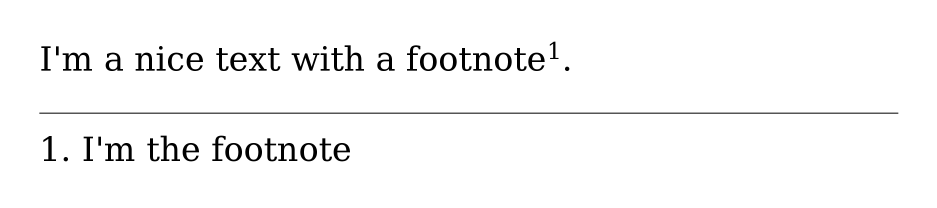
1 2 3 4 5 6 7 8 9 10 11 12 13 14 15 16 17 18 19 20 21 | <style> @page { margin: 0.5cm; size: 450px 100px; @footnote { border-top: 0.1mm solid; margin-top: 0.5em; padding-top: 0.5em; } } ::footnote-call { font-size: 0.7rem; line-height: 1; vertical-align: super; } body { margin: 0; } span { float: footnote; } </style> <div> I'm a nice text with a footnote<span>I'm the footnote</span>. </div> |
gives the following result:
Parallel Flows
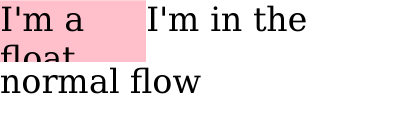
For a long time, elements that aren’t in the normal flow, like floats or absolutes, weren’t breakable. So, if a float element was too long for a page, only the part fitting on the first page was rendered.
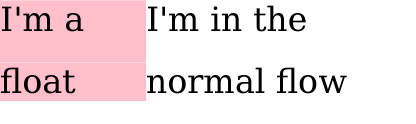
But now, with parallel flows, when a page break appears, we can display the rest of the float on the next page.
A Parallel Flow Example
As an example is better than a lot of words, let’s see what happens with WeasyPrint v53.4 and WeasyPrint v54.0b1 on this sample:
1 2 3 4 5 6 7 8 9 10 11 12 13 14 15 16 17 18 | <style> @page { margin: 0; size: 200px 30px; } div.floated { background: pink; float: left; max-width: 35%; } body { margin: 0; orphans: 1; widows: 1; } </style> <div class="floated">I'm a float</div> <div>I'm in the normal flow</div> |
And More…
Other features have been added in this version:
- Colored Emojis: When we replaced cairo by our own PDF generator, we lost support of colored emojis. But this time is over, colored emojis are back in the game, including vector emojis 🥳!
-
Improvement of
overflow-wrap: theoverflow-wrapproperty now supports the valueanywhere. This may help you dealing with text split, in tables for example. -
DLLs management for Windows: with Python 3.8, DLL resolution changed.
You can now specify to WeasyPrint where to look for the DLLs with the
environment variable
WEASYPRINT_DLL_DIRECTORIES. -
text-align-allandtext-align-last: these properties are now supported if you want to justify the last line of a paragraph.
Thanks a lot to our wonderful contributors for their hard work on this release 💜.
What Are the Next Steps?
The next main step is, of course, to make a real release of this version of WeasyPrint.
But before that, we need you to try this beta and report bugs you may found 🪲!
We’ll then be able to have a really nice version 54 😊.
Have fun with this beta 💜.